
See what you pay, how you use it, and what renews next.
Track recurring subscriptions, record how you use them, estimate cost per use, and review renewals and possible savings. No bank connection required; browser usage signals are optional.
Start with the services you already pay for.
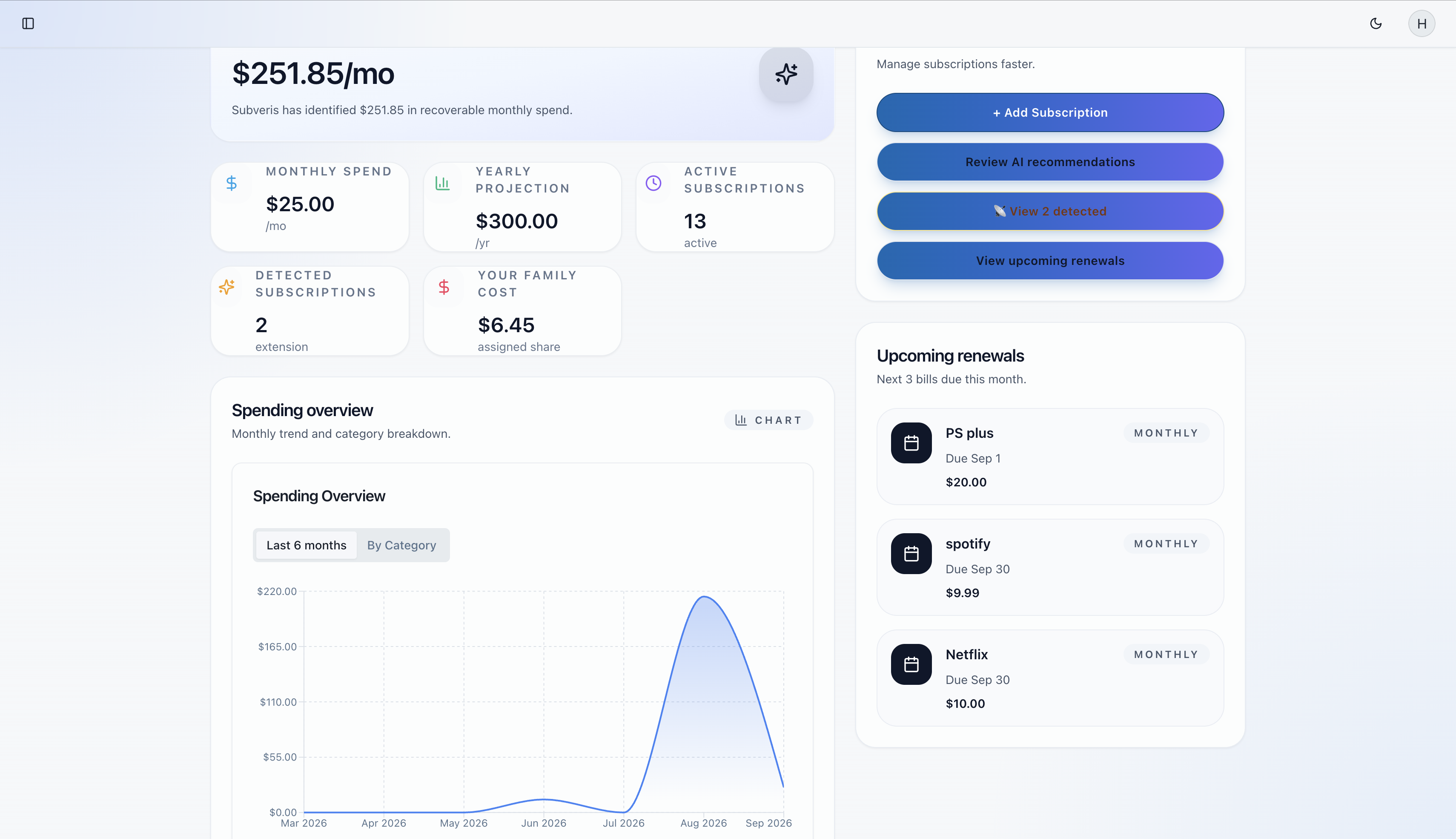
Subscriptions are designed to be forgotten.
Recurring charges are easy to start and easy to overlook. Subveris gives you one place to review what you pay for and how often you use it.
Most people don't know what they actually use.
Subscriptions auto-renew silently.
You pay for services you forgot about.
You don't know your real cost per use.
Features designed for high-value spenders.
Subveris combines clear data handling with practical analytics so you can make better decisions about recurring spending.
Cost Per Use
Estimate what each subscription costs per recorded session and use that context when reviewing your recurring spend.
Optional Browser Signals
Enable the optional browser extension when you want supported usage signals included in your subscription overview.
Usage-Based Recommendations
Subveris highlights possible savings using the subscription costs, usage frequency, recent activity, and cost per use recorded in your account.
No bank data required
You can add and review subscriptions without connecting a bank account. Optional browser usage signals can add context when you enable them.
Protected access
Sensitive actions use authenticated sessions and CSRF checks so your account and billing-related requests are not treated as anonymous.
You control the data
The product is built around the subscriptions you add and the usage signals you intentionally share, rather than hidden financial data collection.
Usage-based recommendations
Recommendations are grounded in the subscriptions you maintain and the usage patterns you track, so decisions are based on real behavior.
Estimated Cost per Use
Compare subscription costs with the usage you record to get another perspective on recurring value.
Renewal Review
See upcoming renewal dates alongside recorded usage so you can review services before they renew.
Possible Savings
Review data-based recommendations and decide whether to keep, change, or cancel a service.
What Subveris shows you
A clear view of the information Subveris uses to help you review recurring spending.
| Capability | How it works |
|---|---|
| Bank connection | Not required. You can add subscriptions manually. |
| Usage signals | Recorded usage and supported browser-extension signals can inform your overview. |
| Value analysis | Monthly cost is compared with activity, frequency, recency, and cost per use. |
| Recommendations | The app highlights services that may be unused, underused, or poor value for you to review. |
| Cancellation | Cancellation guides and provider links help you complete the action yourself. |
| Your decision | Subveris surfaces evidence; you decide whether to keep, downgrade, or cancel. |
See what Subveris actually does
No invented reviews or inflated numbers. These are the product capabilities you can try and verify for yourself.
Start with your real spend
Add recurring services manually and see monthly totals, category spending, recent history, and a yearly projection based on your entries.
Measure value by usage
Record how often you use a service and compare its monthly cost with sessions, recent activity, and cost per use.
Choose the next action
Review recommendations and use the included cancellation guides when a service no longer earns its place in your budget.
A Clearer View of Your Subscriptions
Subveris brings subscription costs, recorded usage, and renewal dates together so people can review recurring services with better context.
A focused tool for subscription tracking and review.
Built for trust and clarity
People use Subveris because it keeps recurring spend understandable and under their control.
Pricing for people who want better subscription decisions.
Start free. Upgrade anytime. Cancel anytime. Cancellation guides are included for everyone.
- Manage up to 5 subscriptions
- Cost-per-use analytics
- Behavioral insights & trends
- Usage-based recommendations
- Savings projections
- Export reports
- Extension tracking
- Autopilot automation
- Unlimited subscriptions
- Browser extension tracking
- Cost-per-use analytics
- Usage-based recommendations
- Behavioral insights
- Savings projections
- Optimization workflows
- Everything in Premium
- Optimization workflows
- Family spending optimization
- Share subscriptions with members
- Family spending insights
- Split costs with family
- Up to 5 family members
Average Premium user saves $120/month — that's $1,440 per year.
Detailed Feature Comparison
| Feature | Free | Premium | Family |
|---|---|---|---|
| Subscriptions Managed | Up to 5 | Unlimited | Unlimited |
| Browser Extension Tracking | |||
| Cost Per Use Analytics | Yes, unlimited | Yes, unlimited | Yes, unlimited |
| Usage-Based Recommendations | |||
| Behavioral Insights | |||
| Savings Projections | |||
| Export Reports | |||
| Optimization Workflows | |||
| Family Sharing | |||
| Up to 5 Family Members |
Pricing Questions
Common Questions
Start Tracking and Reviewing Your Subscriptions
Record usage, estimate cost per use, and review upcoming renewals and possible savings.
Need help? Contact our support team
help.subveris@gmail.comGet in Touch
Have questions? Need help? We're here to assist you.
Email Support
Get help from our expert support team. We typically respond within 24 hours.
help.subveris@gmail.com